Best Handpan Simulator Apps in 2025
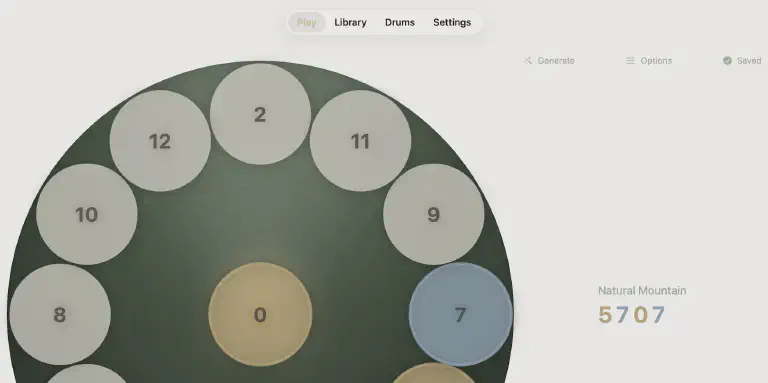 Practice handpan patterns anywhere with a simulator app
You own a handpan. Beautiful instrument. But you can’t always play it.
Maybe you’re traveling. Maybe it’s late and the neighbors would complain. Maybe you’re at work with an idea you want to capture before it disappears. Your handpan sits at home, waiting.
A handpan simulator won’t replace your real instrument. Nothing does. But it fills the gaps - letting you practice patterns, explore new scales, and keep your hands moving when the real thing isn’t within reach.
What Makes a Good Handpan Simulator?
Not all simulators are equal. Some are toys - tap a screen, hear a sound. Others are genuine practice tools that help you improve on your real instrument.
Here’s what separates useful simulators from novelties:
Sound Quality
The sounds should feel right. Not necessarily identical to your specific handpan, but close enough that muscle memory transfers. Cheap, synthetic tones make practice feel pointless.
Accurate Layout
A simulator should mirror how a real handpan works. The ding in the center, tone fields arranged around it. If you practice a pattern on the simulator, your hands should know where to go on the real instrument.
Pattern Tools
Playing random notes is fun for five minutes. Real practice means learning patterns - repeatable sequences that build technique. The best simulators help you discover, save, and loop patterns.
Scale Options
Your handpan is tuned to a specific scale. Kurd, Celtic, Hijaz - whatever you own. A simulator locked to one scale isn’t useful if it doesn’t match your instrument.
Active Development
Apps that haven’t been updated in years may have compatibility issues with newer iOS versions, missing features, or abandoned support. Recent updates signal an app that’s still being improved.
Top Handpan Simulator Apps for iPhone and iPad
DrumFlow
Best for: Pattern generation and practice
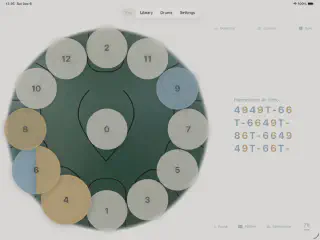
DrumFlow takes a different approach than most simulators. Instead of just letting you tap notes, it generates musical patterns algorithmically - sequences that actually sound good and help build technique.
Key features:
- Pattern generator - One tap creates unique, musical patterns
- Clone your drum - Match your real instrument’s exact scale and layout
- Loop and practice - Repeat patterns at any tempo with the built-in metronome
- Save your favorites - Build a library of patterns that work for you
- Multiple drum types - Handpan and tongue drum in one app
The pattern generation is what sets DrumFlow apart. Instead of hunting for patterns online or trying to remember what you played yesterday, you generate fresh ideas constantly. Save the ones that resonate, practice them anywhere, then play them on your real handpan.
Price: Free Platform: iPhone, iPad Last updated: Actively maintained (2025)
Try DrumFlow Free
Generate patterns, practice anywhere, master your handpan.

Handpan Sim
Best for: Virtual instrument play with learning features
Handpan Sim focuses on the simulator experience itself. Realistic sound samples, responsive touch - it feels close to playing the real thing. Recent updates have added learning-focused features.
Key features:
- Play-along learning library with rhythms
- MIDI export for recording
- Transpose adjustment and reverb effects
- Dynamic key sensitivity (soft/hard presses)
- Screen recording for sharing performances
Good option if you want something that feels like a virtual handpan with play-along content to learn from.
Price: Free with in-app purchases Platform: iOS, Android Last updated: November 2025 (v1.2.2) - actively maintained
Digital Pantam
Best for: Scale exploration
Digital Pantam from Yuval Ezov offers an extensive collection of scales - over 50 options. Useful if you’re considering buying a handpan and want to explore which scales appeal to you before committing.
Key features:
- 50+ handpan scales (Kurd, Hijaz, Celtic, Integral, and more)
- Multi-touch for playing chords
- Shakers to play along (Maracas, Bells, Tambourine)
- Record and share your music
- Relaxing animation effects
The scale variety is impressive, though the interface is more utilitarian than some alternatives.
Price: Paid Platform: iOS, Android Last updated: June 2024 (v2.4) - occasional updates
Handpan (by Aliaksei Vatutsin)
Best for: Simple, functional practice
This app provides straightforward simulator functionality with decent sound quality and a clean interface.
Key features:
- Multiple handpan scales
- Audio recording capability
- Dark theme support
- Realistic sound samples
- visionOS support for Apple Vision Pro
A solid middle-ground option that handles the basics well.
Price: Free with in-app purchases Platform: iOS (including visionOS) Last updated: April 2024 (v2.5) - periodic updates
Meditation Drum HD
Best for: Tongue drum simulation
Worth mentioning for tongue drum players specifically. Focused on the meditative aspects of steel tongue drums with various skins and scales.
Key features:
- Multiple drum skins
- Various scales
- Audio recording
Price: Paid Platform: iOS Last updated: June 2020 (v1.1) - not actively maintained
⚠️ Note: This app hasn’t been updated in over 4 years. It may work on current iOS versions but is no longer receiving improvements or support.
Actively Maintained vs. Abandoned Apps
When choosing a simulator, check when it was last updated. Here’s the current landscape:
| App | Last Update | Status |
|---|---|---|
| DrumFlow | 2025 | ✅ Active |
| Handpan Sim | Nov 2025 | ✅ Active |
| Digital Pantam | Jun 2024 | ⚠️ Occasional |
| Handpan (Vatutsin) | Apr 2024 | ⚠️ Occasional |
| Meditation Drum HD | Jun 2020 | ❌ Abandoned |
Apps with recent updates are more likely to work well on current iOS versions and receive new features. Apps that haven’t been updated in years may still function but won’t improve and could break with future iOS updates.
Simulator vs. Real Handpan: What Transfers?
The honest answer: some things transfer, some don’t.
What Transfers Well
Pattern memory. Learn a pattern on a simulator, and your brain remembers the sequence. Your hands will find it faster on the real instrument.
Scale familiarity. Spend time in D Kurd on a simulator, and you’ll feel at home when you pick up a D Kurd handpan.
Rhythm and timing. Practicing with a metronome builds internal timing that applies to any playing situation.
Musical ideas. Discovering a pattern you love on a simulator gives you something specific to work toward on the real instrument.
What Doesn’t Transfer
Touch dynamics. Real handpans respond to how you strike them - angle, force, finger position. Screens don’t teach this.
Hand independence. The physical coordination of both hands on a curved surface is different from tapping a flat screen.
Resonance and sustain. Managing note duration and letting tones ring requires a real instrument.
Tone quality. Getting a clean, full tone from a handpan takes technique that only develops through practice on metal.
The takeaway: simulators build pattern knowledge and musical ideas. Real instruments build physical technique. Both matter.
When to Use a Handpan Simulator
Traveling
Your handpan stays home. Your phone goes everywhere. Practice patterns during a flight, in a hotel room, waiting for meetings. Keep your hands and brain in practice mode even when the instrument can’t come along.
Late Night Practice
Handpans are quiet compared to drums, but not silent. A simulator with headphones lets you practice at 11 PM without disturbing anyone.
Learning New Patterns
Found a pattern online? Heard something you want to recreate? A simulator lets you experiment without the pressure of producing perfect tone. Focus on the notes, worry about technique later.
Exploring New Scales
Thinking about buying a second handpan in a different scale? Spend time with that scale on a simulator first. Understand how it feels, what patterns work, whether you’ll actually use it.
Capturing Ideas
Musical ideas appear at inconvenient times. A simulator lets you quickly capture a pattern that popped into your head during lunch, before it disappears.
Practice Tips for Simulator Users
Match Your Real Instrument
If you own a handpan, configure your simulator to match. Same scale, same layout. This way, every pattern you learn transfers directly.
Use a Metronome
Most simulators include one. Use it. Sloppy timing on a simulator becomes sloppy timing on the real thing.
Focus on Patterns, Not Random Play
Aimless noodling is pleasant but doesn’t build skill. Work on specific patterns. Repeat them. Increase speed gradually. This is how improvement happens.
Save What Works
When you discover a pattern that feels good, save it. Build a library. These become your go-to ideas when you sit down with your real handpan.
Don’t Forget the Real Thing
Simulators are supplements, not replacements. If you have access to a real handpan, play it. Simulators fill gaps; they don’t substitute for genuine practice.
Common Questions
Can I learn handpan from a simulator alone?
You can learn patterns and develop musical ideas. You cannot learn proper technique - that requires a real instrument. Think of simulators as ear training and pattern memorization tools.
Are handpan simulator sounds realistic?
Modern simulators use recorded samples from real handpans, so the sounds are reasonably accurate. They won't fool anyone who plays, but they're close enough for practice purposes.
Will practicing on a handpan simulator make me better?
Yes, if you practice deliberately. Learning patterns, developing timing, building scale familiarity - these all transfer to real playing. Random tapping doesn't help.
Do professional handpan players use simulators?
Some do, particularly when traveling or as a quick way to capture ideas. No one uses a simulator as their primary practice tool - but as a supplement to real playing, they have value.
Which handpan simulator app should I get?
If you want pattern generation and structured practice, DrumFlow. If you want play-along content, Handpan Sim. If you want to explore many scales, Digital Pantam.
Your Practice, Anywhere
A handpan simulator won’t replace the experience of playing a real instrument. The resonance of metal under your hands, the warmth of a struck tone filling the room - no app captures that.
But simulators serve a real purpose. They keep you connected to your practice when circumstances separate you from your instrument. They help you discover patterns and build musical vocabulary. They let you explore scales before committing to expensive purchases.
The best musicians practice whenever they can, however they can. A simulator gives you one more way to do that.
Ready to Find Your Flow?
Practice handpan patterns anywhere. Free on iPhone and iPad.